What you get
What KitAxis does today, and its limits
This page lists what the beta does now. Every item marked In the beta is deployed and covered by automated tests. Anything that is not available yet is marked Planned or listed under “Not yet”. The beta is free and invite-only.
Plans
A plan says what should happen, where, and how you will know it is done.
In the beta- The outcome you want, what may be changed (the authorized scope) and where the work happens (the target environment).
- What is out of scope, and when to stop, one per line.
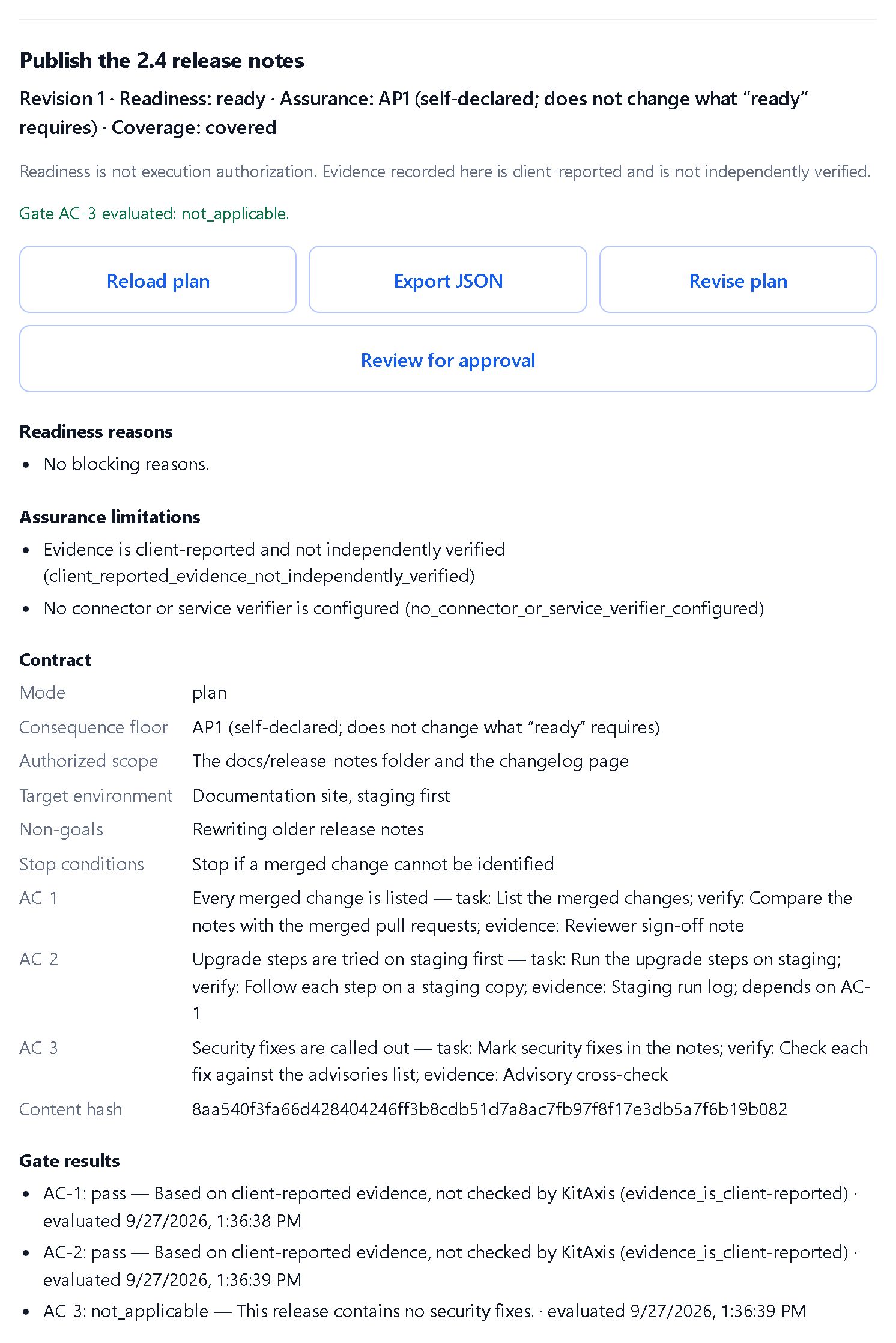
- Up to 100 acceptance criteria: the checks that show the work is done. Each one says what to do, how it will be checked and what evidence to record.
- Dependencies between criteria (for example, AC-2 depends on AC-1), checked so they never loop.
- A mode, review, plan or implement, which sets the plan’s minimum level: AP0, AP1 or AP2.
- A consequence level you choose, from AP0 (negligible) to AP4 (critical). Levels are self-declared labels: they are not certification and do not change what “ready” requires.
- The whole plan must fit in 24 KB, so detailed plans reach that limit before they reach 100 criteria.
Revisions
Plans are never edited in place, so what was checked is always the version you think it was.
In the beta- Every save creates a new, numbered revision that records the revision it replaced.
- A save based on an out-of-date revision is refused, so edits never silently overwrite each other.
- If a new revision would lower the plan’s level, for example by switching from implement to review mode, the web app asks you to confirm first. A connected assistant can confirm the lower level itself.
- Evidence and gate results do not carry over. After any new revision, even a one-word fix, record evidence and evaluate the gates again.
- Open any earlier revision from “Revision history” to read it. Earlier revisions cannot be changed, and only the current one takes evidence, gates and approval.
Evidence
Record what was done, against the criterion it supports.
In the beta- A written summary of up to 8,000 characters, recorded against a criterion and its task.
- An optional SHA-256 fingerprint of the result, so you can later show which file or output the evidence refers to.
- Evidence is permanent and belongs to the revision it was recorded for.
- Evidence is client-reported; not independently verified by KitAxis. The fingerprint is stored as given and is not checked.
- Evidence is text. There are no file uploads or attachments.
Gates and readiness
KitAxis tells you, criterion by criterion, what is still missing.
In the beta- Evaluate a gate for each criterion. A gate checks that evidence is recorded for that criterion and for every criterion it depends on.
- Mark a gate not applicable, with a written rationale.
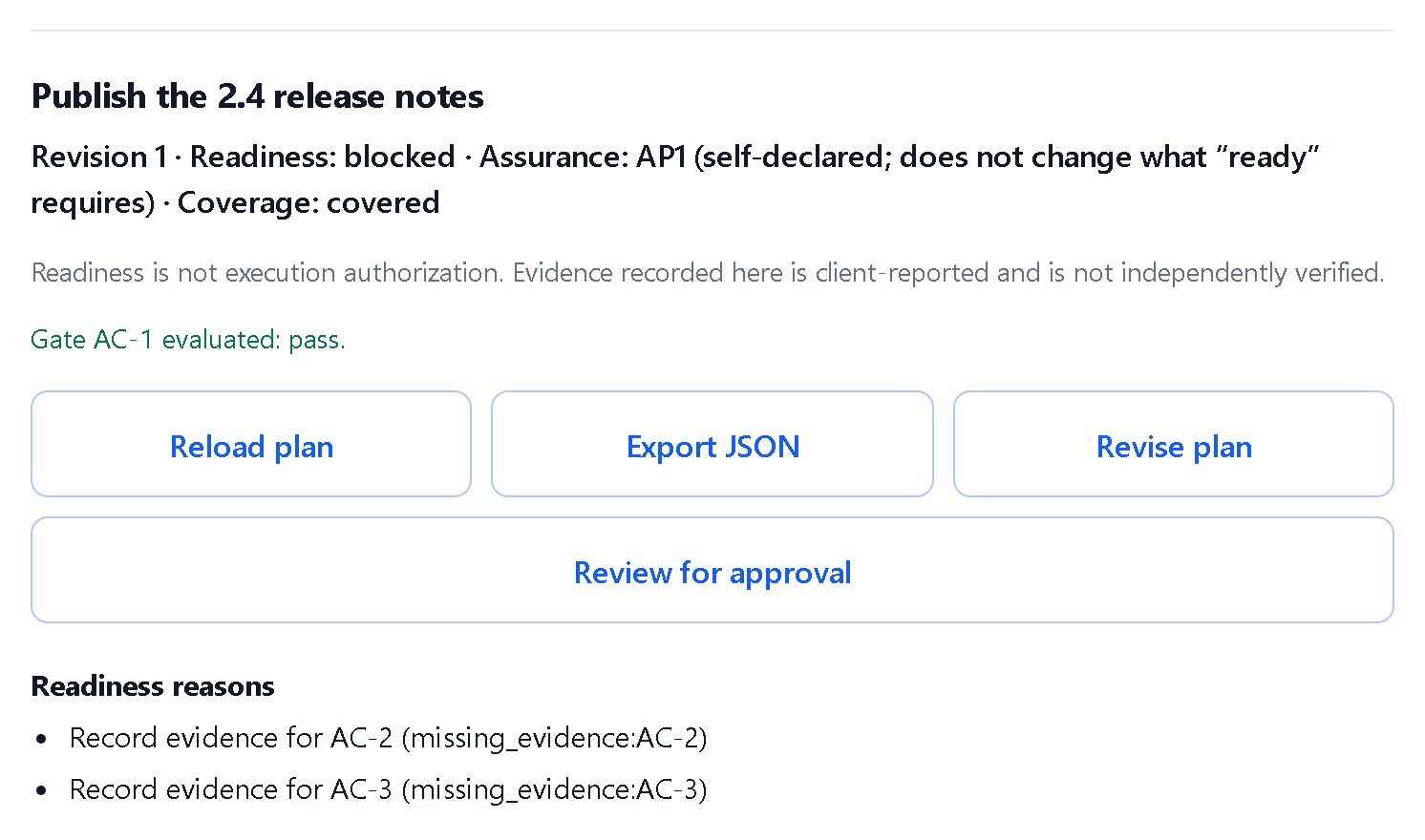
- Every revision shows one of four states, Blocked, Reviewing, Ready or Cancelled, with the reasons in plain language.
- You can cancel a revision, with a reason.
- Ready means complete and evidenced for this revision; not execution approval. A gate checks that evidence exists, not what it says.
Sign-off
Approve the exact revision you reviewed, and nothing else.
In the beta- You approve after re-entering your password.
- The approval is bound to the revision’s content fingerprint and expires after one hour.
- Saving a new revision supersedes the approval. You can revoke any active approval from the plan’s approvals list, again with your password.
- Only a revision that shows Ready can be approved. KitAxis checks readiness when you approve and refuses a blocked or cancelled revision.
- An approval is a record. Nothing runs when a plan is approved.
Export
Take a plan with you, for your records or for the tools you use.
In the beta- Download any plan as a JSON file: the current revision and its content hash, its evidence, gate results and approvals.
Workspaces and your account
Your own private place to plan.
In the beta- Workspaces, with projects inside them, picked from lists: no IDs to copy.
- No other KitAxis user can open your workspaces.
- Email and password sign-in with a verified email address, and password reset by email.
- A usage view that shows your requests and changes in the last hour and your total storage.
- Your rights over your data are described in the privacy notice.
- Workspaces and projects cannot be renamed, shared or deleted one by one yet.
AI assistant connection
Plan with an AI assistant while you talk to it.
In the beta- Connect an AI assistant over the Model Context Protocol (MCP). Tested end to end with Claude Code; other assistants have not been tested yet.
- You approve each connection on a KitAxis page, and you can disconnect it under “Connected assistants” in the web app.
- A connected assistant can create workspaces, projects and plans, save revisions, record evidence, evaluate gates, and read and export plans.
- It can never approve a plan, cancel one or delete anything. See AI assistants.
- KitAxis is independent of, and not endorsed by, Anthropic, OpenAI or any AI assistant provider.
The app
What it looks like
Screenshots of the KitAxis beta web app, taken on a test copy with example plans. Select an image to open it full size.
Not yet
What the beta does not include
So there are no surprises, these are not available today.
- Team sharingWorkspaces belong to one account.
- File attachmentsEvidence is text, with an optional fingerprint.
- Email notificationsThe only emails are account verification and password-reset emails.
- Two-factor or single sign-onSign-in is email and password.
- API keys and developer docsThere is no public developer API yet.
- Editing or deleting single recordsHistory and evidence are permanent by design.
- Paid plansThe beta is free. See Beta & pricing.
- Uptime commitmentThe beta runs on a single server. See Security.
Try it in the beta
Free, invite-only, for up to 20 testers. Ask for an invite and tell us what you would plan in KitAxis.